Open source AI we use to work on Wagtail
What’s working for us right now

If you’ve been using AI tools but haven’t tried open source models yet, you’re missing out. Here’s a quick recap on what we found to work well with Wagtail projects. Things you can try right now.
Why it’s worth your time
Two reasons: agency, and capability. Sure, frontier Large Language Models and $200 subscriptions can do a lot. But they fall short in critical aspects of our ethos when it comes to AI adoption. Open source models have a mixed track record too, but there are a lot more opportunities to focus on the options that are right for you. Working with those options forces you to make more informed choices about AI adoption. You get to decide on the tradeoffs you want to make. Owners, not renters, as Mozilla frame it. And when future models come our or new techniques emerge, you’re equipped to understand the implications.
AI inference providers
There are dozens of options. Here are the three we’re working with most so far:
- Scaleway: the primary provider we use when testing Wagtail AI. We like their clear environmental commitments and good choice of available models.
- Neuralwatt: great for coding. They fully report energy cost of your usage.
- Or run it locally! The best option if you’re not sure where to start. We use Ollama (super simple) and LM Studio (gigantic range of models).
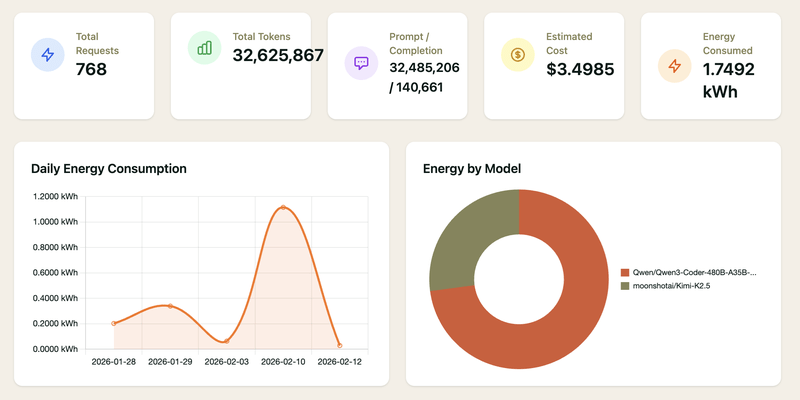
Here’s an example of a very tangible benefit of this greater diversity of options. Neuralwatt’s reporting of AI inference energy use. No need to ballpark the energy use of AI coding agents, your AI provider directly tells you:
Open source models
Here as well, there are many options. Here are some of our go-to when we work on Wagtail AI or related projects like llms.txt support:
- For general-purpose use: Mistral Small, or GPT-OSS. They’re small, fast, easy to run. Mistral have a good track record of transparency about their models’ footprint.
- For coding: Qwen3 Coder. It’s available in a wide range of sizes, from tiny "autocomplete" models to deep thinking ones. Kimi K2.5 is also worth a try. It’s a very capable model (in the top 10 of coding agents!), and very large, but its architecture is optimized for low energy use.
- For multilingual support: Apertus. They also lead the way in transparency by having open source data / training in addition to the model weights.
Here again, if you’re not sure where to start - pick a model that can run on your own device. We like Ministral 3B. Or go even smaller with LFM2.5, which will run on anything. Both have a ton of capability for models of this size.
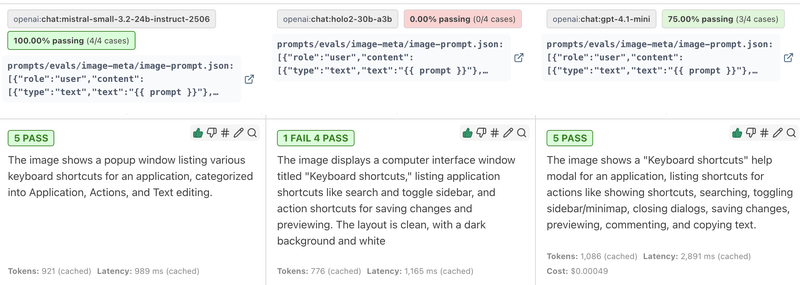
The beauty of open source models isn’t so much any specific model’s performance; it’s the breadth of options. And you don’t have to try them out one by one; use tools like Promptfoo to compare many models in one go. Here it is checking how the smaller Holo2 model fares at image alt text compared to Mistral Small and GPT 4.1:
Open source tools
If you’re not sure what tool to use those models with, our go-to options here as well:
- Jan as a ChatGPT replacement, that can work locally or with inference providers.
- OpenCode as a CLI coding harness, with built-in support for a lot of providers.
- Continue if you prefer your agent in your code editor.
- Any LLM from Mozilla to integrate your application with any provider or model.
Go for it!
All of this selection of providers and models takes extra work, and it can easily feel overwhelming. But it’s worth the effort, and with a few minutes you’ll be able to get something up and running.
This Week in Wagtail
A weeklyish newsletter with Wagtail tips, news, and more.